Tax Amount Calculation Scenario
Calculating the tax amount for individuals or entities is a meticulous task that involves understanding different slabs, exemptions, and sometimes, variable rates based on incomes or profits. This process demands an accurate interpretation of an entity's financial status, sources of income, and applicable deductions. Additionally, the tax liability often varies based on the nature of income – whether it's from salary, business profits, investments, or other sources.
Understanding these nuances is crucial for determining the accurate tax liability, ensuring regulatory compliance, and maintaining the trust of taxpayers. Moreover, an efficient and transparent tax calculation system can significantly reduce the chances of discrepancies and subsequent disputes.
What We Will Do:
Collecting Taxpayer's Information
Gather fundamental taxpayer details such as full name, email, phone number, residential status (Resident, Non-Resident, Not Ordinarily Resident), type of income (salary, business, capital gains), and any applicable deductions. Validating this information is paramount to ensure an error-free tax computation.
Understanding Income Slabs and Rates
Data Gathering: The system will prompt the user to input their total annual income.
Categorization Process: Based on the provided details, the system will categorize the taxpayer into specific income slabs. Different slabs have different tax rates associated with them.
Annual Income Range Tax Rate Up to $50,000 5% $50,001 to $100,000 10% $100,001 to $200,000 20% Above $200,000 30%
Considering Deductions and Exemptions
Data Gathering: Obtain a list of all applicable deductions like 401(k) contributions, mortgage interests, or specific business expenses.
Deduction Type Example Deductible Amount 401(k) Contributions $19,500 Mortgage Interest $7,500 Home Office Deduction $1,500 Travel Costs (Mileage) $560 Charitable Donations $6,000 Deduction Process: Subtract the total value of all these deductions from the gross annual income to determine the taxable income.
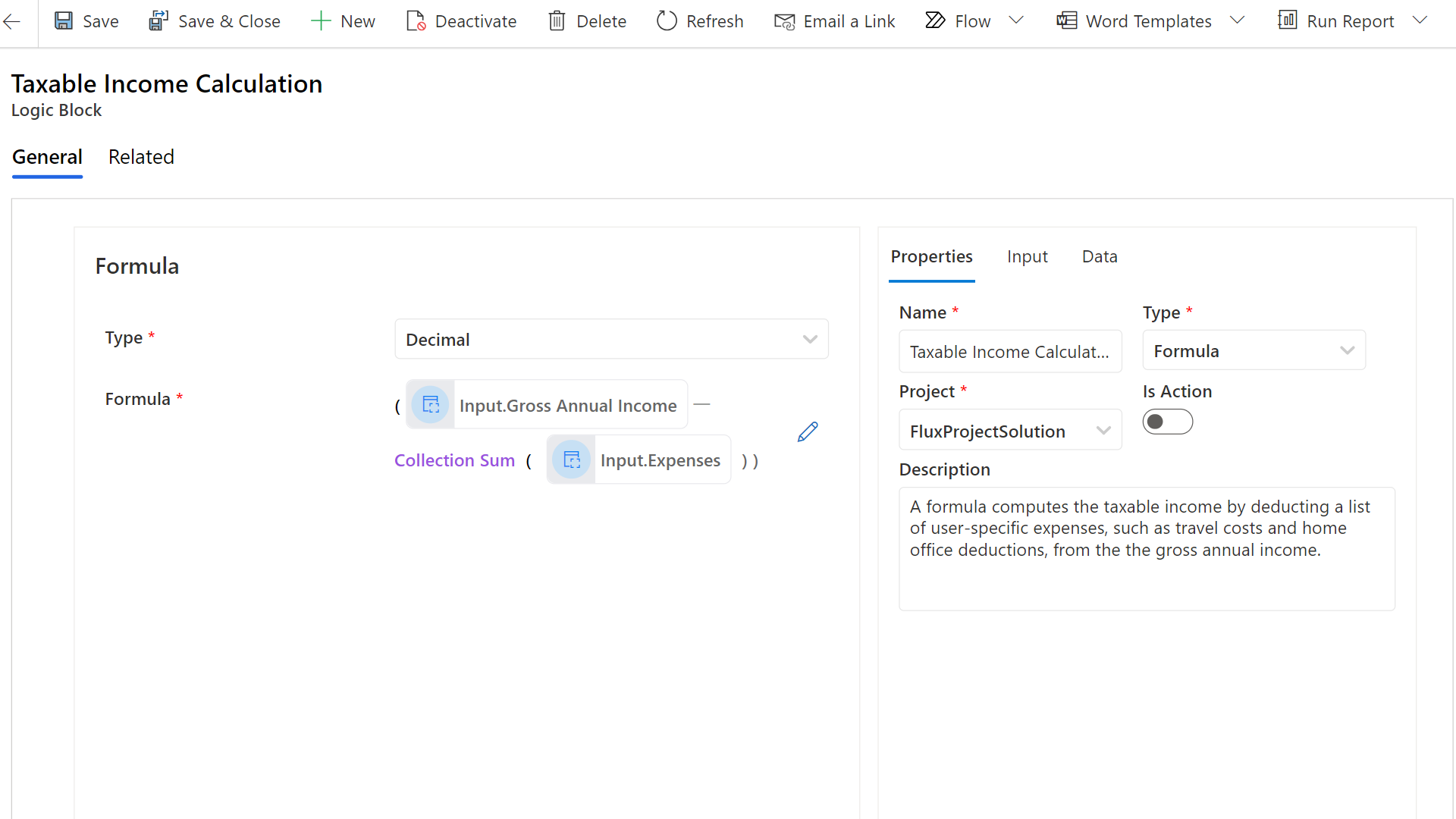
Taxable Income = Gross Annual Income - Sum of All Deductions
Tax Amount Determination
Utilizing the tax rates and the taxable income, calculate the final tax amount payable by the taxpayer. Then by using a decision table in the system will help apply the correct tax rate based on the taxable income.
| Taxable Income Range | Tax Rate | Calculated Tax | Label |
|---|---|---|---|
| Up to $50,000 | 5% | Taxable Income × 0.05 | Low Income |
| $50,001 to $100,000 | 10% | Taxable Income × 0.10 | Middle Income |
| $100,001 to $200,000 | 20% | Taxable Income × 0.20 | Upper-Middle Income |
| Above $200,000 | 30% | Taxable Income × 0.3 | High Income |
Communicating the Tax Liability: Building the Flow
Post computation, the final tax amount will be displayed. This transparency ensures that taxpayers understand their tax liability well in advance, allowing them to make necessary provisions. The detailed breakup will also highlight how different components (income sources, deductions) have influenced the final tax figure.
Solution
Before diving into the calculations, it's crucial to have the right information. We're going to start by validating all the taxpayer details to ensure everything's accurate. This solid foundation will guide us efficiently through the subsequent phases, from understanding income brackets to determining the final tax liability. Let's kick things off with the validation process.
Step 1: Building The Taxpayer's Information Validation Set
To initiate our solution, we will be designing a Validation Set. That accept the taxpayer informations as input.
- Phone Number
- Full Name
- Residential Status
- Income Type
Each of these inputs is equipped with its own validation block to ensure accuracy and correct format, as shown in the picture below.
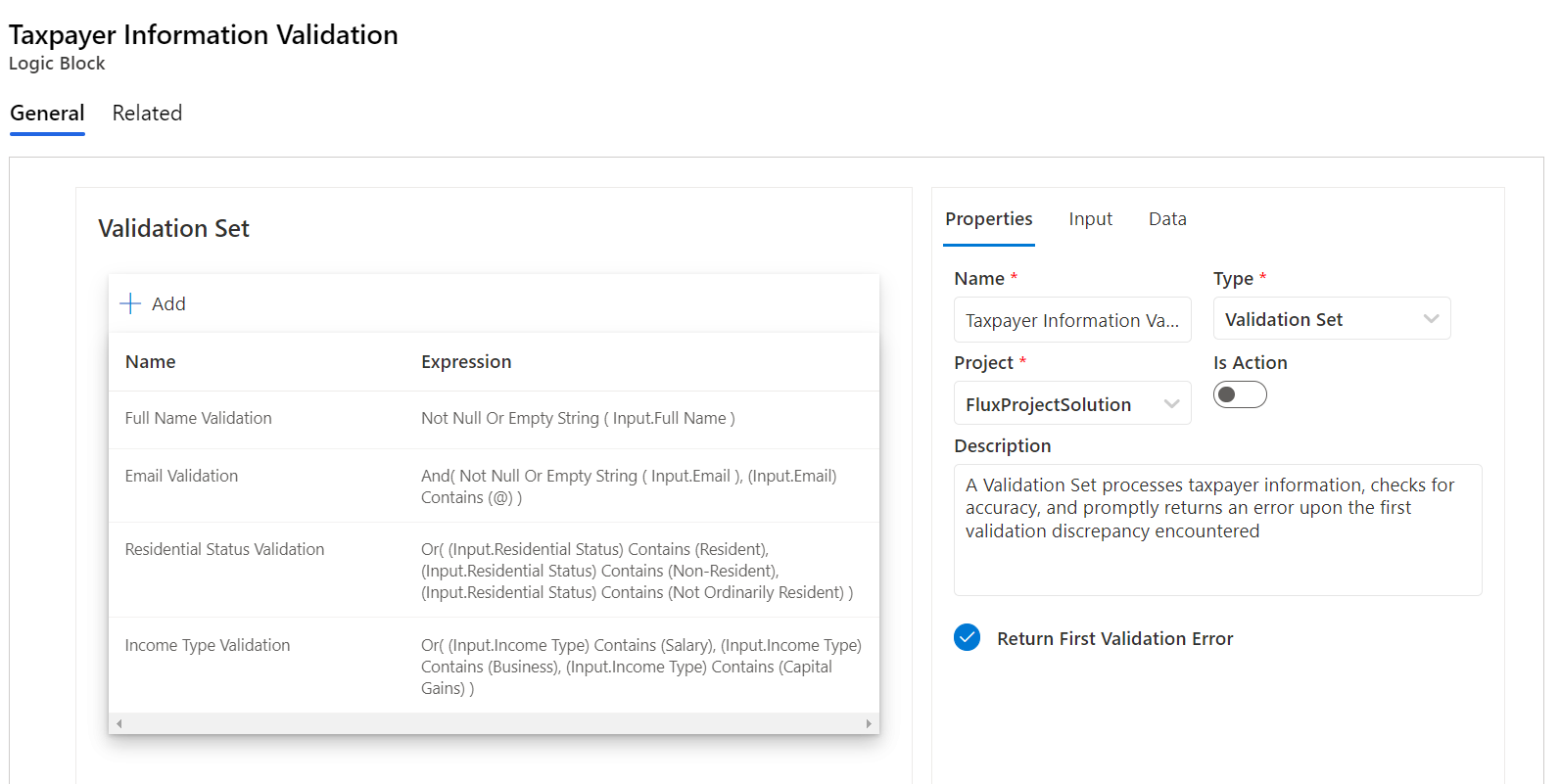
And the validation set return an error upon encountering the first inconsistency or inaccuracy. This is to ensure immediate feedback for rectification. With our Validation Set in place, it guarantees that all subsequent steps in the evaluation rely on verified and dependable data.
Step 2: Building The Taxable Income Formula Block
Now that we have the taxpayer's details validated, it's time to dive deeper into the numbers. The next phase involves crafting a formula that accurately represents how taxable income is determined. We'll factor in various expenses and deductions that the user might have, from things like travel costs to home office deductions. By subtracting these from the gross annual income, we'll land on the exact taxable amount. Let's build that formula block.
Step 3: Creating the Tax Amount Decision Table
To ensure a precise tax calculation for each citizen, we'll construct a decision table. This table will take into consideration the computed taxable income, and based on predefined tax slabs, it will provide the exact amount of tax due. Through this systematic approach, we ensure clarity and accuracy in tax determination.
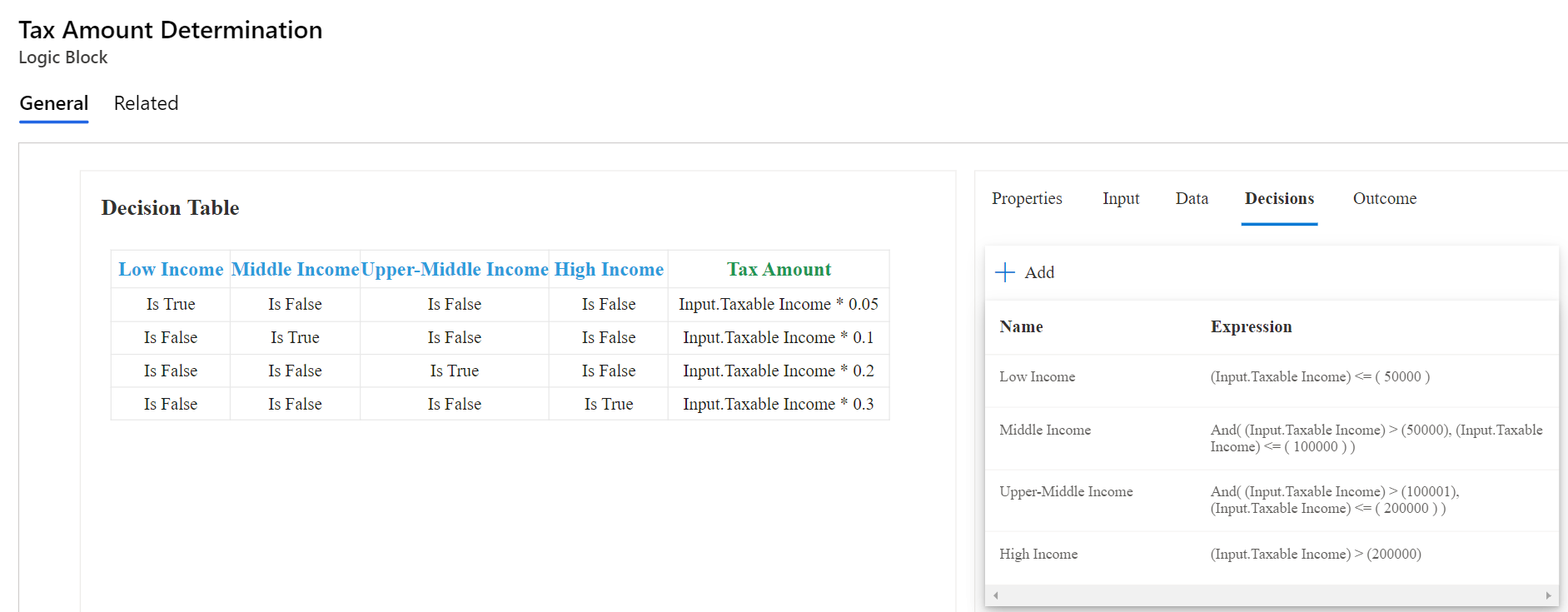
In the table above, each row is associated with a specific income category. A 'True' value in a column identifies the income group relevant for that row. To elucidate:
- In the first row, where the 'Low Income' column is marked 'True', the tax amount is derived by multiplying the taxable income by 5%.
- In the second row, with only the 'Middle Income' column set to 'True', the tax rate applied is 10% of the taxable income.
- The third row, highlighted by the 'Upper-Middle Income' column being 'True', uses a tax rate of 20% on the taxable income.
- Lastly, in the fourth row where 'High Income' is the sole 'True' column, a tax rate of 30% is applied to the taxable income.
By using this decision table, we ensure a transparent and organized methodology for determining tax amounts, promoting consistent and precise tax calculations across different income levels.
Step 4: Connecting the Dots - Building The Tax Calculation Logic Flow
Flows logic operate as structured sequences, emphasizing the systematic orchestration of tasks in a designated order. At the core of this flow are individual steps, each directing the flow's ensuing action. In the context of tax calculation, each step ensures we're working with precise data and correctly applying tax rules, resulting in an accurate tax liability figure.
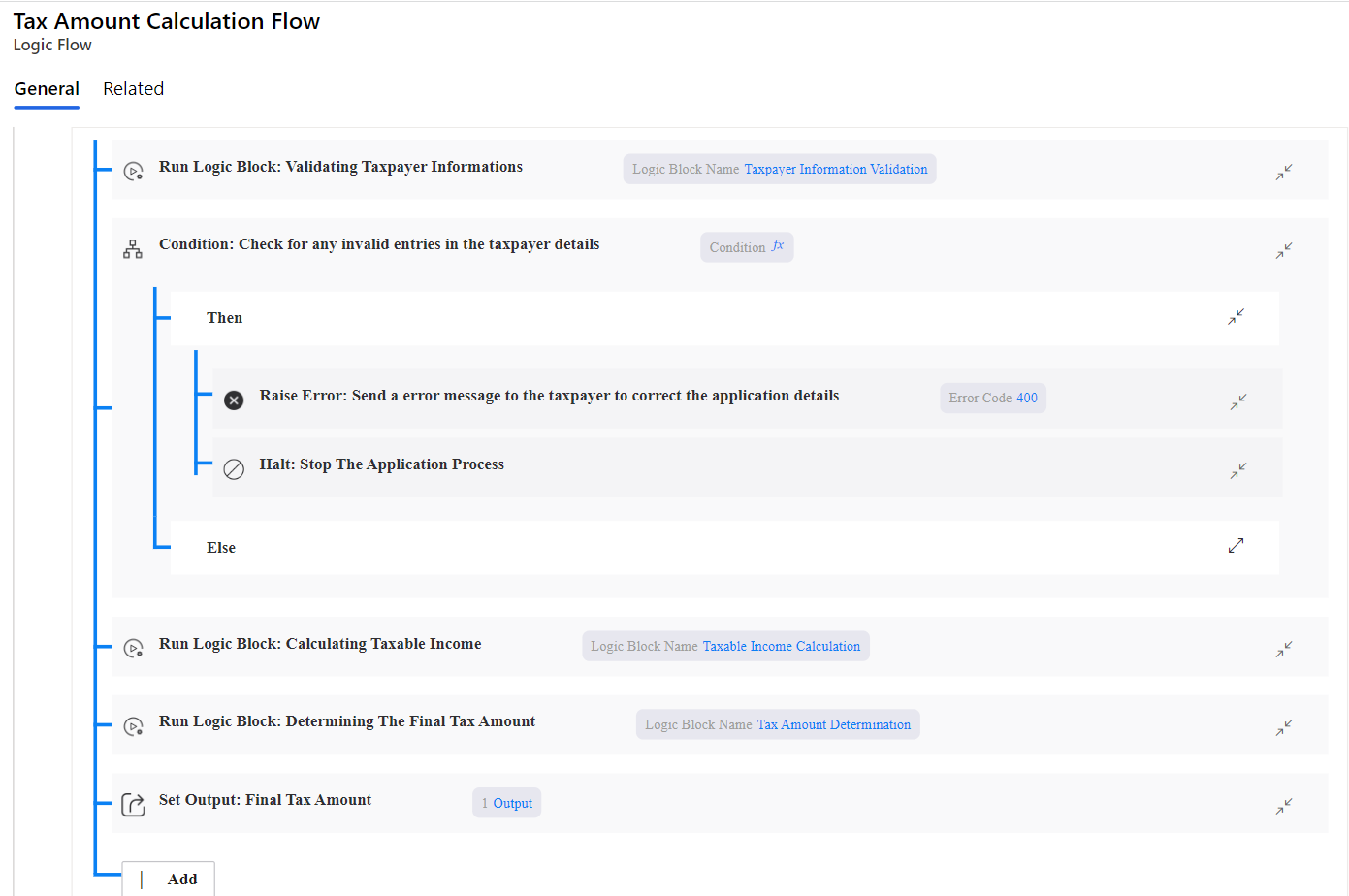
Based on the flow illustrated above, let's break down the tax calculation process:
Data Collection: Initiating the flow involves gathering comprehensive taxpayer details — both basic and financial.
Validation of Data: As discussed in Step 1, all the taxpayer details are processed through the Validation Set. This step ensures that all provided details are accurate and in the correct format. If any data is found to be inconsistent or inaccurate, it's flagged for rectification.
Error Handling: As the next step in the sequence, we check for invalid data. If any discrepancies are identified in the previous validation step, an error message is immediately returned to the user, halting the process. This ensures the taxpayer rectifies the inconsistency before proceeding further.
Calculating Taxable Income: Now, with validated data at hand, we move to Step 3, where the taxable income is calculated using the formula block. This calculation deducts any eligible expenses and deductions from the taxpayer's gross annual income to determine the final taxable amount.
Determining Tax Amount: Following this, the computed taxable income is run through the Tax Amount Decision Table from Step 3. Depending on the taxpayer's income bracket, a corresponding tax rate is applied, generating the due tax amount.
Each step in this flow is critically interlinked. Results from one step feed directly into the next, ensuring that the tax calculation process remains fluid, coherent, and accurate.