Employee Raise Calculation Scenario
Determining an employee's salary raise often depends on multiple factors: performance ratings, current salary, and the department or role of the employee. In a structured organization, automating this process ensures fairness, transparency, and adherence to predefined criteria. This tutorial offers a step-by-step guide on how to calculate the raise an employee should receive based on standardized guidelines.
What We Will Do:
Gathering Employee's Information
Capture essential details:
- Full Name
- Current Salary (Between 850 and 2500)
- Years Of Service (At least 1 Year of service)
- Department (HR, Engineering, Marketing, Design)
Base Raise Determination:
- Data Gathering:
- Performance Rating dictates the base percentage raise.
Calculation Process:
| Performance Rating | Base Raise Percentage |
|---|---|
| Basic | 0% |
| Average | 3% |
| Proficient | 5% |
| Outstanding | 7% |
Departmental Adjustment:
Different departments might have different budgets or scales for raises due to the nature of the job market, competition, or strategic company initiatives.
- Data Gathering:
- Department influences the adjustment to the base raise.
Adjustment Process:
| Department | Adjustment |
|---|---|
| HR Or Marketing | +0.5% |
| Design | +1.2% |
| Engineering | +2.2% |
Final Raise Calculation:
Combine the base raise percentage with any departmental adjustments, then apply this percentage to the employee's current salary.
Calculation:
Final Raise = Current Salary × (Base Raise Percentage + Departmental Adjustment)
Communicating Raise Outcome: Building the Flow
Once the raise is determined, communicate the new salary and the percentage increase to the employee. This ensures the employee understands how their raise was calculated and recognizes the factors that influenced it.
Solution
Before delving into the specifics of calculating an employee's raise, it's essential to start by capturing and rigorously validating the employee's information. Ensuring the accuracy of our data is paramount. With that in place, we can proceed to a structured and transparent raise determination process. Let's get started.
Step 1: Creating a Validation Set For the Employees Information
To initiate our solution, we will be designing a Validation Set. That accept the loan Employee Informations as input.
- Full Name
- Current Salary
- Years Of Service
- Department
Each of these inputs is equipped with its own validation block to ensure accuracy and correct format, as shown in the picture below.
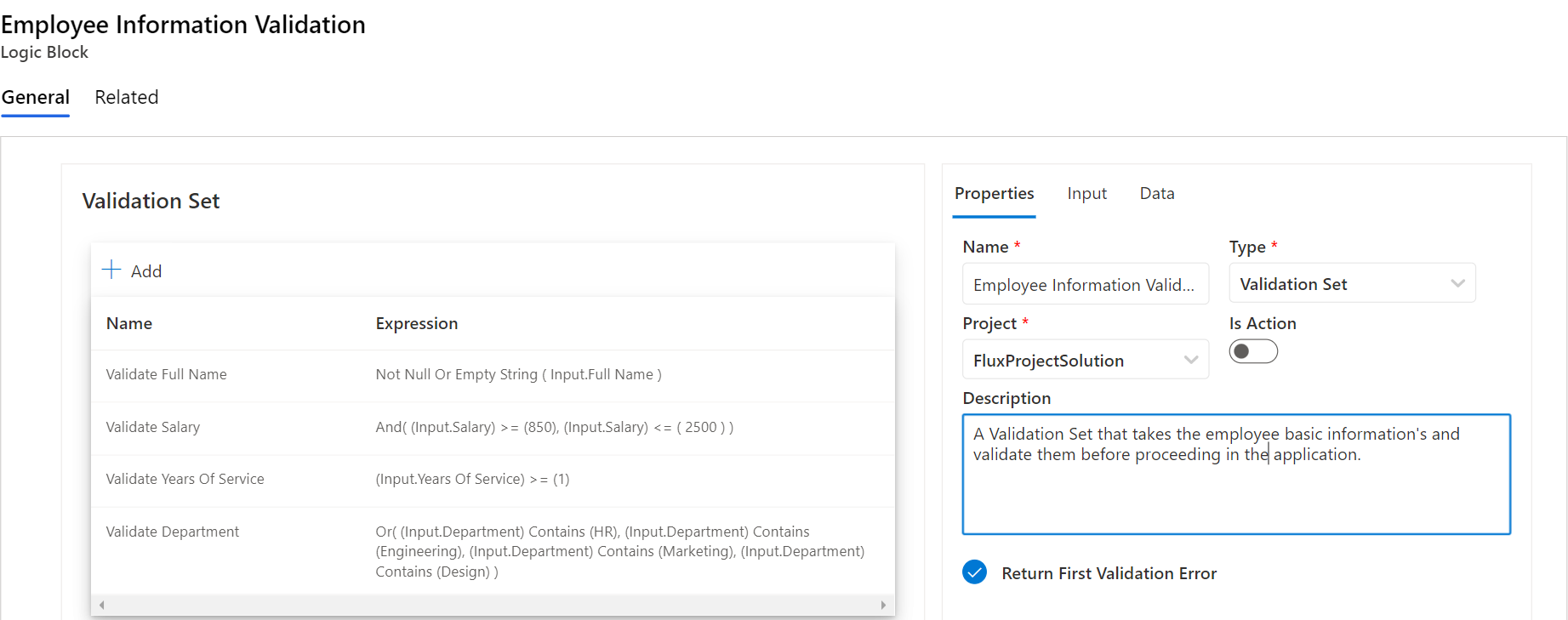
And the validation set return an error upon encountering the first inconsistency or inaccuracy. This is to ensure immediate feedback for rectification. With our Validation Set in place, it guarantees that all subsequent steps in the evaluation rely on verified and dependable data.
Step 2: Creating A Decision Table to Determine the Base Raise
In this step, we will focus on creating a decision table specifically designed to determine the base raise for each employee based on their performance. This table will provide a clear and consistent framework to ensure that raises are allocated fairly and transparently. Let's explore its structure and functionality.
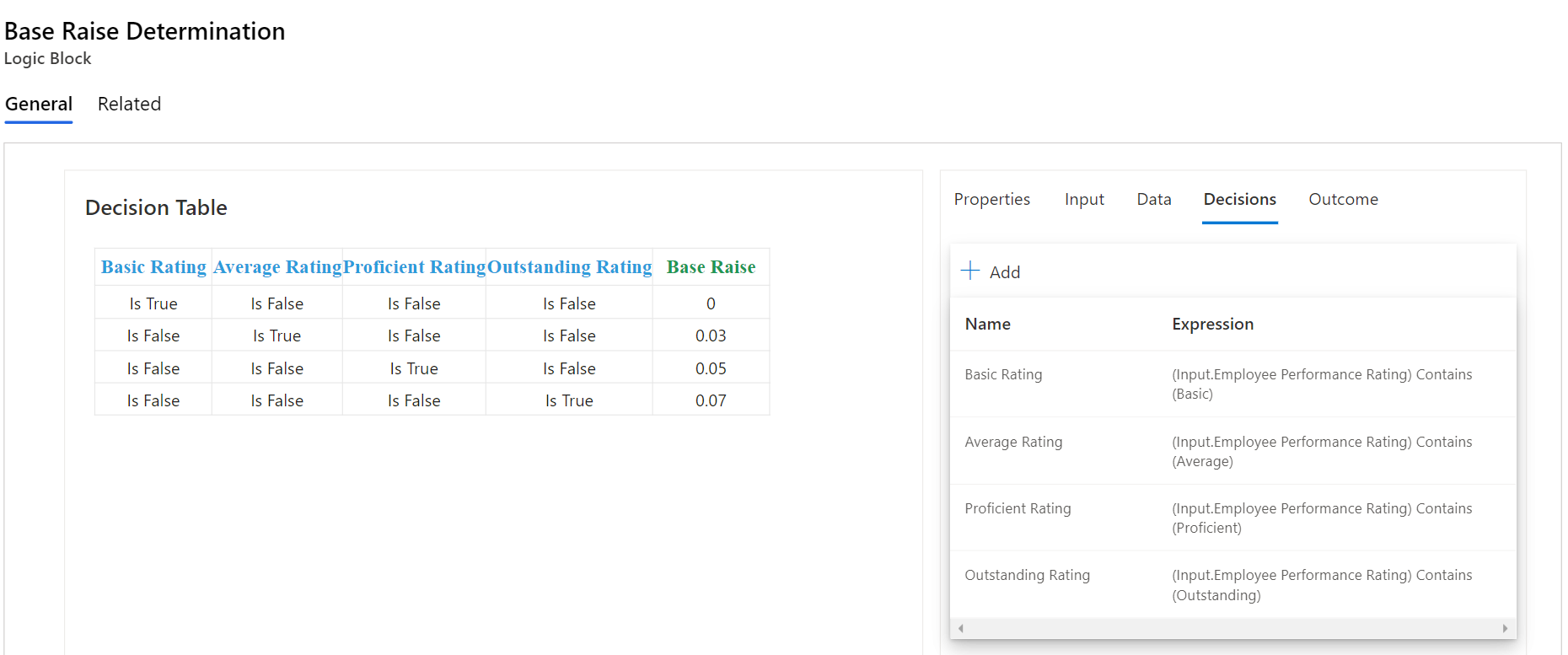
In the above table, each row corresponds to a specific performance rating. A 'True' value in a column indicates the applicable performance rating for that row. For instance, in the first row, where the 'Basic' rating column is 'True', the base raise is 0%. In the second row, with the 'Average' rating column marked as 'True', the base raise is set at 3%. This table clearly and succinctly dictates the base raise percentage for each performance rating, as determined by the columns with 'True' values.
Step 3: Creating a Decision Table to Determine the Department Raise
In this step, we shift our focus from individual performance ratings to another crucial aspect of salary adjustments: the departmental raise. Recognizing that different departments may have unique requirements and performance benchmarks, it's imperative to have a structured approach. This step introduces a decision table designed specifically to ascertain the raise based on the department an employee belongs to.
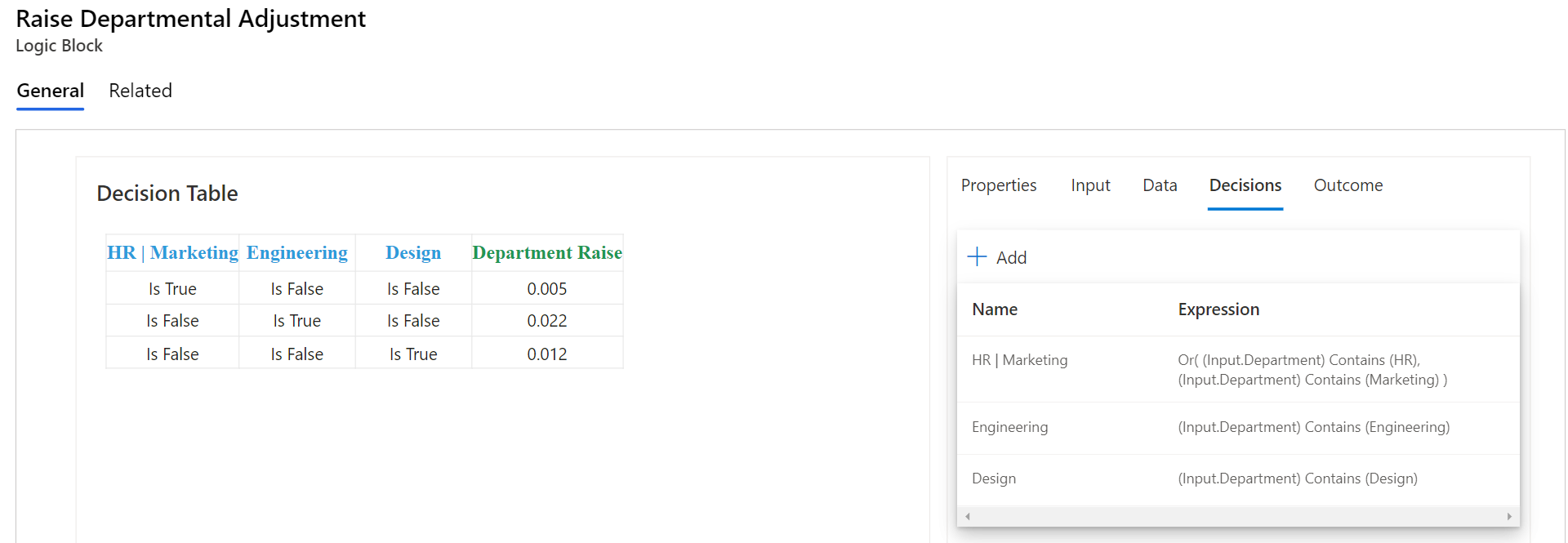
In the above table, each row represents a distinct department within the organization. A 'True' value in a column signifies that the departmental raise is applicable for that specific row. For instance, in the first row where the 'HR' department column is marked 'True', the departmental raise is set at 0.5%. In the following row, with the 'Marketing' department column marked as 'True', the raise is designated at 2.2%. In the third row, where the 'Engineering' department column is 'True', the raise is determined to be 1.2%. This table provides a clear and precise breakdown of the departmental raise percentages, as dictated by the columns with 'True' values.
Step 4: Creating a Formula to Calculate the Raise and New Salary
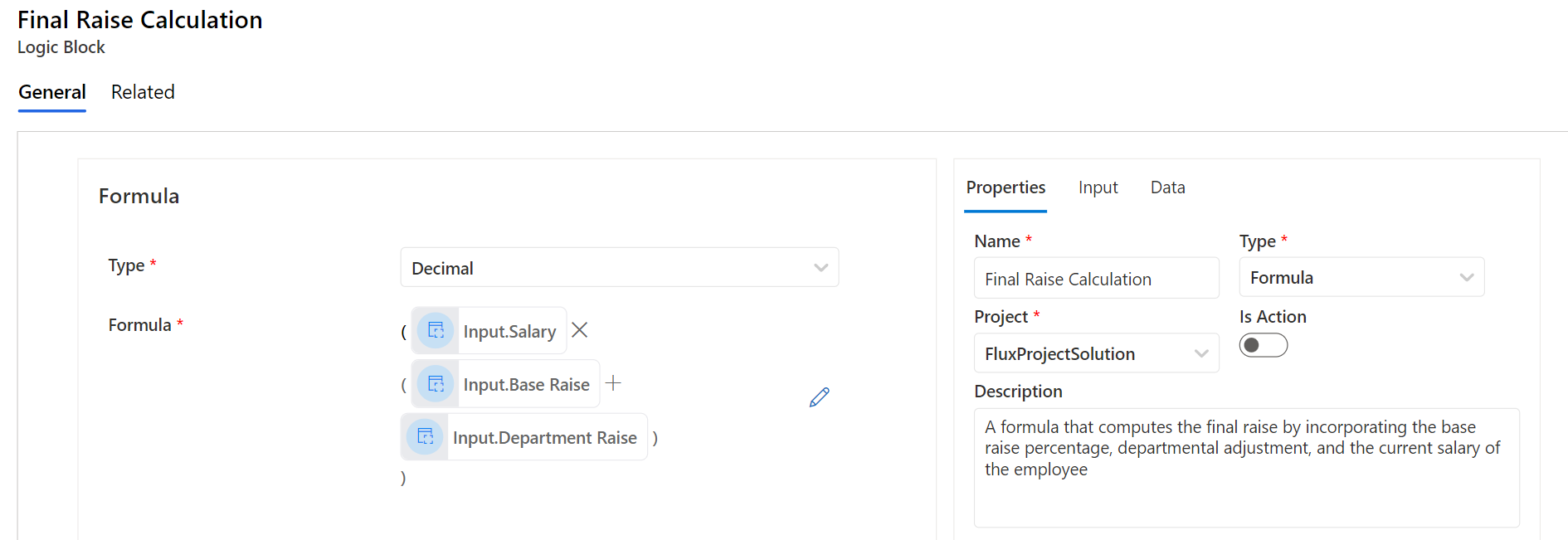
In Step 4, we're set to introduce two key formulas that will anchor our salary adjustment process. The first formula is dedicated to calculating the raise: it multiplies the current salary by the combined value of the base and departmental raises. The second formula, on the other hand, determines the new salary: it sums the current salary with the computed raise value. Let's break down these formulas and explore how they work in conjunction to provide a comprehensive understanding of the salary adjustment mechanism
Raise Calculation Formula
New Salary Calculation Formula
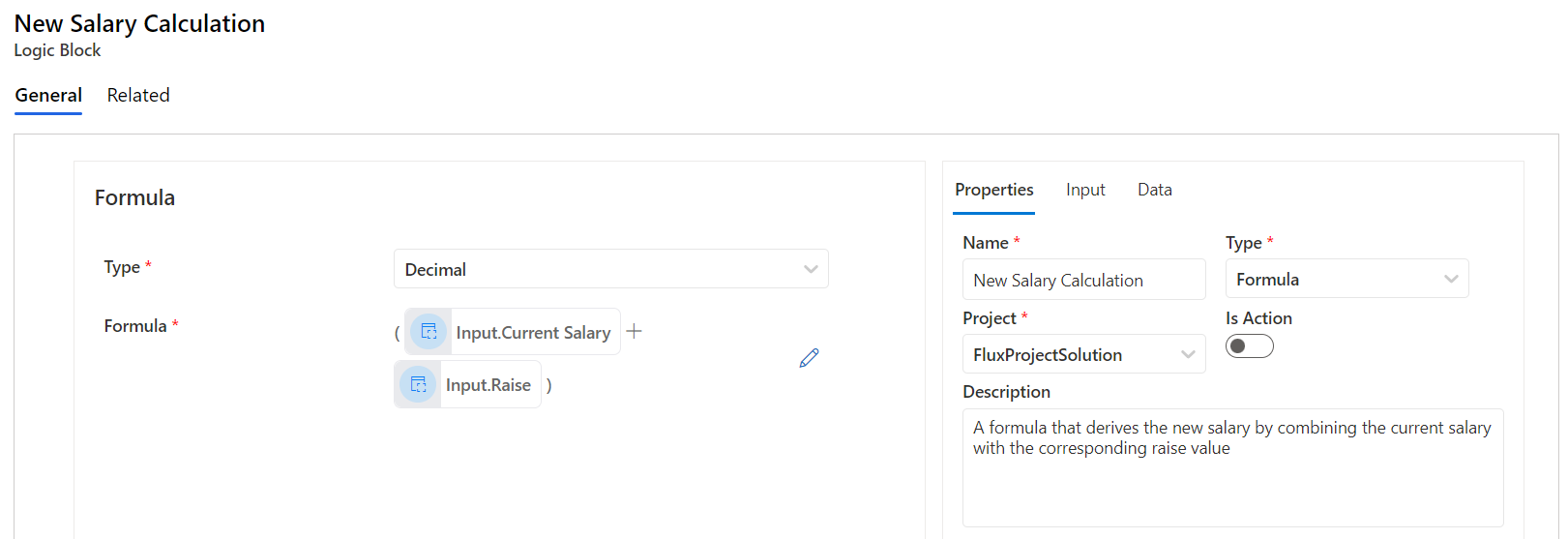
Having these formulas solidifies our approach to salary adjustments. Simply put, the first calculates the raise, and the second determines the updated salary. By using this clear method, we streamline the process, ensuring uniform and fair outcomes for all employees.
Step 5: Connecting the Dots - Creating the Employee Raise Logic Flow
Flows logic function as structured sequences, emphasizing the systematic orchestration of tasks in a designated order. At the heart of this methodology are the individual steps, each pivotal in guiding the process towards the desired outcome. When addressing employee salary adjustments, each step guarantees meticulous data handling and the equitable application of raise criteria, resulting in a fair and transparent salary update for every staff member.
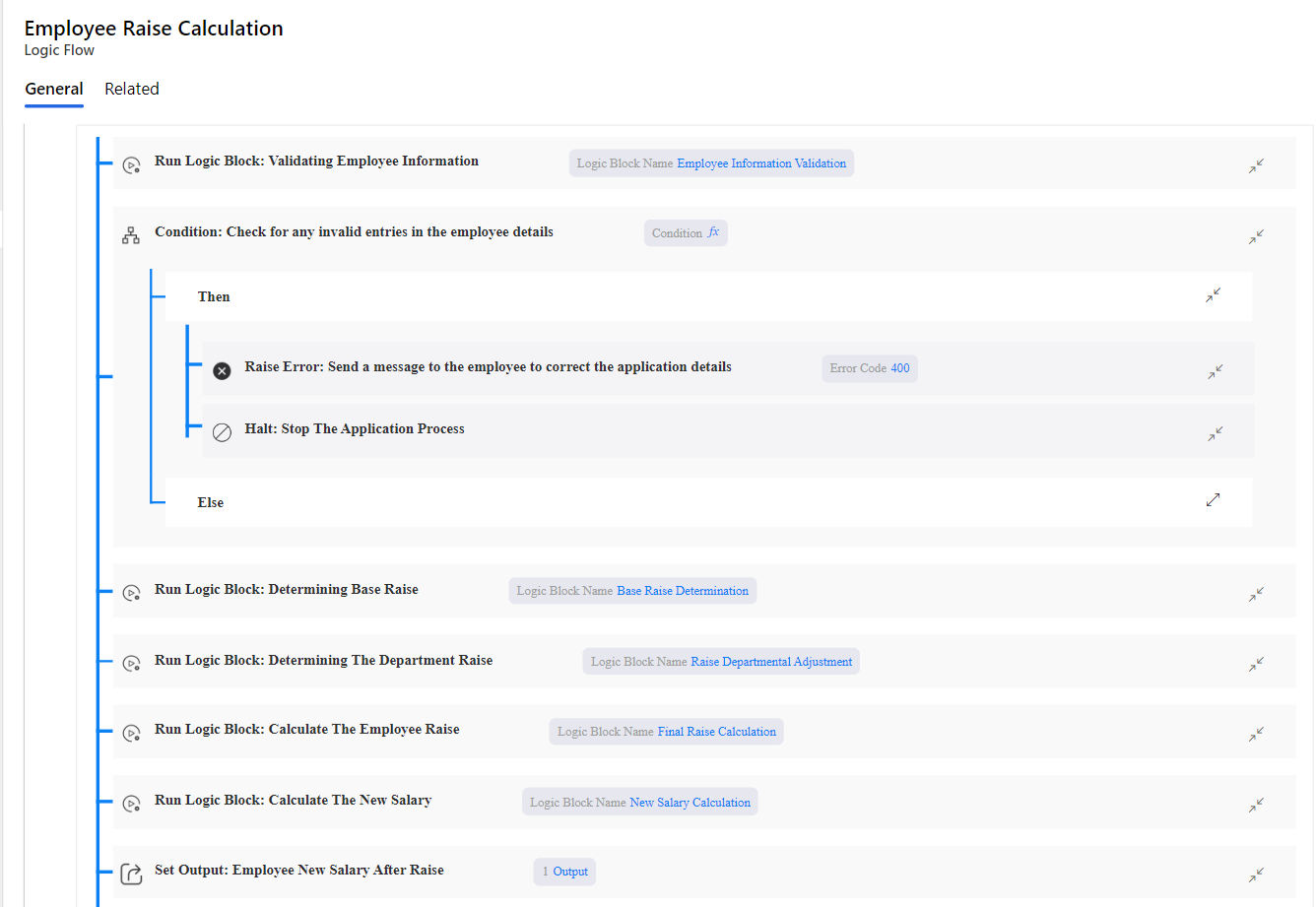
Following the flow in the picture above, here’s the step-by-step breakdown:
Gathering Employee Information: This is the starting point, where we collect all the necessary details about an employee, including their current salary, years of service, performance rating, and department.
Data Validation: As highlighted in Step 1, all the collected information is channeled through the Validation Set. If any discrepancies arise, the process is halted and an error message is returned for immediate correction.
Determining the Raise Percentage: Using the decision tables from Steps 2 and 3, we ascertain the base raise based on the employee’s performance and the departmental raise. These percentages are then combined to get the total raise percentage for the employee.
Calculating the Salary Increase and Adjusted Salary: Based on the derived raise percentage, we use the formulas from Step 4. The first formula computes the absolute raise amount. The second formula then determines the employee’s new salary by adding the raise to their current salary.
Communication of Adjusted Salary: Upon completing the calculations, the system automatically updates the employee's record with the adjusted salary. Additionally, a detailed breakdown, including both the base and departmental raise percentages and the new salary amount, is communicated to the employee for clarity and transparency.
By employing this structured flow, the organization ensures that each salary adjustment is made methodically, with clear criteria in place. Such a process promotes fairness, transparency, and efficiency, ensuring that employees are rewarded appropriately based on their performance and departmental needs.